Trace Genkit with Langfuse
Langfuse can ingest Genkit traces via OpenTelemetry. Once your Genkit application exports OTLP spans, Langfuse maps Genkit spans into traces and observations with model input, output, and usage data when available.
What is Genkit? Genkit is an open-source framework for building AI features and agentic workflows with structured flows, tool calling, and model integrations.
What is Langfuse? Langfuse is an open-source LLM engineering platform for observability, prompt management, and evals.
This Langfuse integration is OpenTelemetry-based, not Go-specific. If your Genkit setup already exports OTLP traces, you can point that exporter at Langfuse. For Genkit Go, the common setup is the Genkit OpenTelemetry plugin.
Step 1: Install the Genkit OpenTelemetry plugin
go get github.com/xavidop/genkit-opentelemetry-goThe package is documented in the genkit-ai/opentelemetry-go-plugin repository.
Step 2: Configure Langfuse credentials
export LANGFUSE_BASE_URL="https://cloud.langfuse.com" # 🇪🇺 EU region
# export LANGFUSE_BASE_URL="https://us.cloud.langfuse.com" # 🇺🇸 US region

export LANGFUSE_PUBLIC_KEY="pk-lf-..."
export LANGFUSE_SECRET_KEY="sk-lf-..."
Step 3: Initialize the OpenTelemetry plugin
Configure the plugin to send OTLP/HTTP traces to your Langfuse instance. Langfuse currently accepts OTLP over HTTP, so set OTLPUseHTTP: true. The example below disables metrics export because this setup is only sending traces to Langfuse.
package main

import (
    "context"
    "encoding/base64"
    "log"
    "os"

    "github.com/firebase/genkit/go/genkit"
    opentelemetry "github.com/xavidop/genkit-opentelemetry-go"
)

func main() {
    baseURL := os.Getenv("LANGFUSE_BASE_URL")
    if baseURL == "" {
        baseURL = "https://cloud.langfuse.com"
    }

    publicKey := os.Getenv("LANGFUSE_PUBLIC_KEY")
    secretKey := os.Getenv("LANGFUSE_SECRET_KEY")
    if publicKey == "" || secretKey == "" {
        log.Fatal("LANGFUSE_PUBLIC_KEY and LANGFUSE_SECRET_KEY must be set")
    }

    auth := base64.StdEncoding.EncodeToString([]byte(publicKey + ":" + secretKey))

    plugin := opentelemetry.New(opentelemetry.Config{
        ServiceName:            "my-genkit-app",
        ForceExport:            true,
        DisableMetricsExporter: true,
        OTLPEndpoint:           baseURL + "/api/public/otel/v1/traces",
        OTLPUseHTTP:            true,
        OTLPHeaders: map[string]string{
            "Authorization":                "Basic " + auth,
            "X-Langfuse-Ingestion-Version": "4",
        },
    })

    genkit.Init(
        context.Background(),
        genkit.WithPlugins(plugin),
    )
}
Step 4: Run your Genkit flows
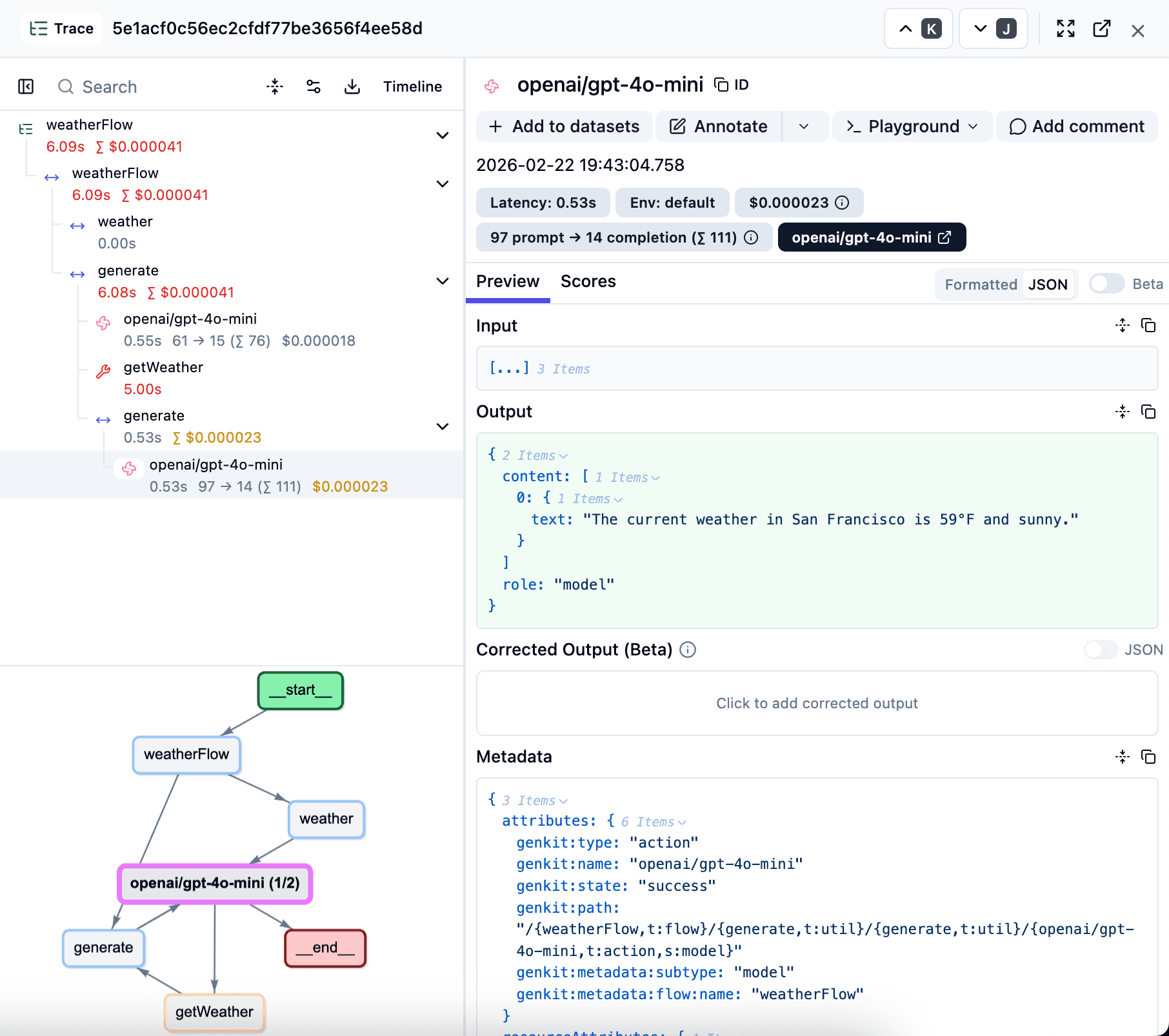
After initializing the plugin, Genkit flows and model calls emit OpenTelemetry spans. Langfuse ingests those spans and displays them as traces with nested observations, including inputs, outputs, tool calls, and token usage when Genkit provides that metadata.
If you already use an OpenTelemetry Collector, you can route Genkit spans through the Collector and export them to Langfuse from there. For endpoint and authentication details, see the Langfuse OpenTelemetry guide.
Step 5: View traces in Langfuse
Open Traces in Langfuse to inspect flow executions, model calls, latency, cost, and errors. If traces do not show up in local development, double-check ForceExport: true, the OTLP endpoint, and the Basic Auth credentials.
Troubleshooting
- No traces appear in Langfuse
- The Genkit OpenTelemetry plugin is initialized before your flows run.
OTLPUseHTTPis set totrue.- The OTLP endpoint points to
https://<your-langfuse-host>/api/public/otel/v1/traces. - The
Authorizationheader contains the Base64-encodedpublic_key:secret_keypair. - If the
X-Langfuse-Ingestion-Version: 4header is not set, traces may still ingest successfully but can take up to 10 minutes to appear in Langfuse. ForceExportis enabled in short-lived local processes so spans are flushed before the program exits.
Next steps
Once traces are flowing, you can use Langfuse to debug prompt inputs and outputs, add scores, and build dashboards on top of your Genkit workflows.
Manage prompts in Langfuse
Add evaluation scores
Run LLM-as-a-judge Evaluators
Create datasets
Create custom dashboards
Test queries in the Playground
Last edited
